See GhostChat in Action
Watch how easily you can add AI chat to your website in under 2 minutes
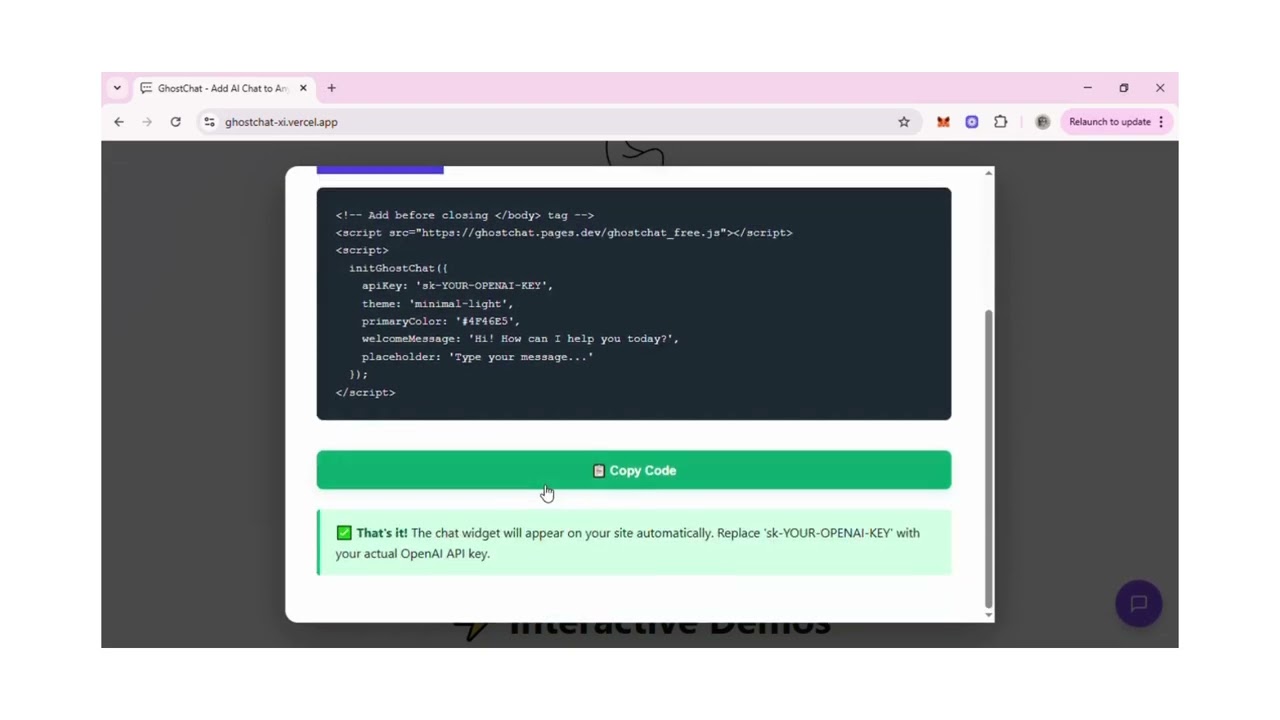
GhostChat works with OpenAI, DeepSeek & more. Copy → Paste → Done in 30 seconds.
Watch how easily you can add AI chat to your website in under 2 minutes
See what our customers are saying about GhostChat
Discover how GhostChat outperforms other chatbot solutions
One-time payment gets you lifetime access. No hidden costs or recurring subscriptions like Intercom or Drift.
Add to any website in 30 seconds. No complex backend setup or dependencies required.
Our context scraping feature makes your chatbot an expert on YOUR content, not just generic responses.
Use OpenAI, DeepSeek, Anthropic, Google Gemini, or even self-hosted models like Ollama.
Your API keys stay with you. We don't store conversations or sensitive data on our servers.
Beautiful, customizable themes that match your brand identity without any design work.
Click to load the real GhostChat widget and test it live!
Clean, professional light theme. Perfect for modern websites and SaaS products.
Sleek dark theme for night-mode sites and developer-focused products.
GhostChat is a lightweight JavaScript widget you can drop into any site.
You provide an API key (OpenAI, DeepSeek, Anthropic, or others) — GhostChat handles the UI, input box, messaging display, and streaming.
Premium licenses unlock context scraping (like FAQ pages, docs, or entire URLs).
It's fully client-side, meaning no backend setup is required — unless you want to use license validation or self-host the proxy.
Context scraping allows your AI chatbot to understand your website content before answering questions. Instead of generic responses, your bot becomes an expert on YOUR business.
Extracts question-answer pairs from your FAQ page. When users ask "What's your return policy?", the bot answers using YOUR actual policy from your website.
Reads a single page (like your About page or Product page) and uses that content to answer questions. Perfect for giving context about your company, products, or services.
Crawls multiple pages on your site (up to 10 pages, 2 levels deep). The bot learns from your entire documentation, blog, or knowledge base. Perfect for comprehensive support.
Example: A customer asks "Do you ship internationally?" → Bot finds this in your FAQ → Responds with your exact shipping policy. No manual training needed!
See what's included in each tier
| Feature | Free | Personal | Agency |
|---|---|---|---|
| OpenAI GPT-3.5 | ✓ | ✓ | ✓ |
| OpenAI GPT-4 | ✗ | ✓ | ✓ |
| Anthropic Claude | ✗ | ✓ | ✓ |
| Google Gemini, Ollama, WebLLM | ✗ | ✗ | ✓ |
| Minimal Light & Dark Themes | ✓ | ✓ | ✓ |
| Glassmorphism & Terminal Themes | ✗ | ✓ | ✓ |
| Ghost Orb Theme | ✗ | ✗ | ✓ |
| FAQ Scraping | ✗ | ✓ (3 pages) | ✓ (10 pages) |
| Content Summarization | ✗ | ✓ (10k chars) | ✓ (50k chars) |
| Full Site Scraping | ✗ | ✗ | ✓ (2-level deep) |
| Domain License | N/A | 1 domain | Unlimited |
| Priority Support | ✗ | ✗ | ✓ |
Choose your platform and copy the code
<!-- Add before closing </body> tag -->
<script src="https://ghostchat.pages.dev/ghostchat_free.js"></script>
<script>
  initGhostChat({
    apiKey: 'sk-YOUR-OPENAI-KEY',
    theme: 'minimal-light',
    primaryColor: '#7C3AED',
    welcomeMessage: 'Hi! How can I help you today?',
    placeholder: 'Type your message...'
  });
</script>
<!-- Add before closing </body> tag -->
<script src="https://ghostchat.pages.dev/ghostchat_main.js"></script>
<script>
  initGhostChat({
    licenseKey: 'PERSONAL-XXXXX-XXXXX-XXXXX-XXXXX',
    apiKey: 'sk-YOUR-OPENAI-KEY',
    theme: 'glassmorphism',
    provider: 'openai:gpt-4',

    // Context scraping: Bot learns from your FAQ
    contextMode: 'faq',
    contextUrl: 'https://yoursite.com/faq',
    scrapingApiUrl: 'https://your-scraping-server.com/api/scrape',

    primaryColor: '#8b5cf6',
    welcomeMessage: 'Hi! I can answer questions about our products.',
    placeholder: 'Ask me anything...'
  });
</script>
// App.js or App.tsx
import { useEffect } from 'react';

function App() {
  useEffect(() => {
    // Load GhostChat script
    const script = document.createElement('script');
    script.src = 'https://ghostchat.pages.dev/ghostchat_free.js';
    script.async = true;
    script.onload = () => {
      window.initGhostChat({
        apiKey: 'sk-YOUR-OPENAI-KEY',
        theme: 'minimal-dark',
        primaryColor: '#7C3AED'
      });
    };
    document.body.appendChild(script);

    return () => {
      // Cleanup on unmount
      const widget = document.getElementById('ghostchat-widget');
      if (widget) widget.remove();
    };
  }, []);

  return (
    <div className="App">
      {/* Your app content */}
    </div>
  );
}

export default App;
// App.js with context scraping
import { useEffect } from 'react';

function App() {
  useEffect(() => {
    const script = document.createElement('script');
    script.src = 'https://ghostchat.pages.dev/ghostchat_main.js';
    script.async = true;
    script.onload = () => {
      window.initGhostChat({
        licenseKey: 'PERSONAL-XXXXX-XXXXX-XXXXX-XXXXX',
        apiKey: 'sk-YOUR-OPENAI-KEY',
        theme: 'glassmorphism',
        provider: 'openai:gpt-4',

        // Scrape your docs for context
        contextMode: 'summarize',
        contextUrl: 'https://yoursite.com/docs',
        scrapingApiUrl: 'https://your-scraping-server.com/api/scrape',

        primaryColor: '#8b5cf6'
      });
    };
    document.body.appendChild(script);
  }, []);

  return <div className="App">{/* content */}</div>;
}
<!-- Go to Appearance → Theme Editor → footer.php -->
<!-- Add before </body> tag -->

<script src="https://ghostchat.pages.dev/ghostchat_free.js"></script>
<script>
  initGhostChat({
    apiKey: 'sk-YOUR-OPENAI-KEY',
    theme: 'minimal-light',
    primaryColor: '#7C3AED',
    welcomeMessage: 'Welcome! How can I help you today?'
  });
</script>
<!-- Perfect for WooCommerce stores -->
<script src="https://ghostchat.pages.dev/ghostchat_main.js"></script>
<script>
  initGhostChat({
    licenseKey: 'PERSONAL-XXXXX-XXXXX-XXXXX-XXXXX',
    apiKey: 'sk-YOUR-OPENAI-KEY',
    theme: 'minimal-dark',
    provider: 'openai:gpt-4',

    // Bot learns from your WooCommerce FAQ
    contextMode: 'faq',
    contextUrl: '<?php echo home_url('/faq'); ?>',
    scrapingApiUrl: 'https://your-scraping-server.com/api/scrape',

    welcomeMessage: 'Need help with your order? Ask me!',
    primaryColor: '#8b5cf6'
  });
</script>
// pages/_app.js
import { useEffect } from 'react';
import '../styles/globals.css';

function MyApp({ Component, pageProps }) {
  useEffect(() => {
    // Load GhostChat on client side only
    const script = document.createElement('script');
    script.src = 'https://ghostchat.pages.dev/ghostchat_free.js';
    script.async = true;
    script.onload = () => {
      window.initGhostChat({
        apiKey: process.env.NEXT_PUBLIC_OPENAI_KEY,
        theme: 'minimal-light',
        primaryColor: '#7C3AED'
      });
    };
    document.body.appendChild(script);
  }, []);

  return <Component {...pageProps} />;
}

export default MyApp;
// pages/_app.js - Agency tier with full scraping
import { useEffect } from 'react';

function MyApp({ Component, pageProps }) {
  useEffect(() => {
    const script = document.createElement('script');
    script.src = 'https://ghostchat.pages.dev/ghostchat_main.js';
    script.async = true;
    script.onload = () => {
      window.initGhostChat({
        licenseKey: process.env.NEXT_PUBLIC_LICENSE_KEY,
        apiKey: process.env.NEXT_PUBLIC_OPENAI_KEY,
        theme: 'ghost-orb',
        provider: 'openai:gpt-4',

        // Full scrape: Bot learns from multiple docs pages
        contextMode: 'full_scrape',
        contextUrl: 'https://yoursite.com/docs',
        scrapingApiUrl: process.env.NEXT_PUBLIC_SCRAPING_API,

        primaryColor: '#8b5cf6'
      });
    };
    document.body.appendChild(script);
  }, []);

  return <Component {...pageProps} />;
}
<!-- Go to: Online Store → Themes → Actions → Edit Code -->
<!-- Open: Layout/theme.liquid -->
<!-- Add before closing </body> tag -->

<script src="https://ghostchat.pages.dev/ghostchat_free.js"></script>
<script>
  initGhostChat({
    apiKey: 'sk-YOUR-OPENAI-KEY',
    theme: 'minimal-light',
    primaryColor: '{{ settings.color_accent }}',
    welcomeMessage: 'Welcome to {{ shop.name }}! How can I help?',
    buttonText: '💬 Chat with us'
  });
</script>
<!-- Perfect for e-commerce support -->
<script src="https://ghostchat.pages.dev/ghostchat_main.js"></script>
<script>
  initGhostChat({
    licenseKey: 'PERSONAL-XXXXX-XXXXX-XXXXX-XXXXX',
    apiKey: 'sk-YOUR-OPENAI-KEY',
    theme: 'glassmorphism',
    provider: 'openai:gpt-4',

    // Bot learns from your shipping/returns page
    contextMode: 'faq',
    contextUrl: '{{ shop.url }}/pages/shipping-returns',
    scrapingApiUrl: 'https://your-scraping-server.com/api/scrape',

    welcomeMessage: 'Hi! Need help with shipping, returns, or products?',
    primaryColor: '{{ settings.color_accent }}'
  });
</script>
One-time payment, lifetime access. No subscriptions.
Everything you need to know about GhostChat
No! GhostChat is fully client-side. Just include the script and initialize it. The only backend you need is your AI provider (OpenAI, Anthropic, etc.). For premium features like context scraping, you can use our scraping server or self-host it.
FREE: OpenAI GPT-3.5
Personal: OpenAI (GPT-3.5, GPT-4), Anthropic
Claude
Agency: All of the above plus Google Gemini,
Ollama, WebLLM, and custom providers
Context scraping allows your chatbot to learn from your website content. When initialized, GhostChat fetches and processes your FAQ pages, documentation, or product pages. The AI then uses this context to give accurate, relevant answers about YOUR business instead of generic responses.
Example: Customer asks "What's your return policy?" → Bot finds it in your FAQ → Responds with your exact policy.
Yes! Your API key is used directly from the browser to the AI provider. We never see, store, or have access to your API keys. All communication happens client-side. However, note that your API key will be visible in your page source, so consider using a proxy server for production if this is a concern.
Absolutely! GhostChat supports custom colors, positions, welcome messages, and placeholders. You can choose from pre-built themes (minimal-light, minimal-dark, glassmorphism, terminal-console, ghost-orb) or customize the CSS for complete control. Agency tier includes white-label options.
FREE: Basic chat with GPT-3.5, 2 themes
Personal ($29): GPT-4, Claude, 4 themes,
FAQ/summarize scraping (3 pages, 10k chars)
Agency ($99): All providers, full scraping (10
pages, 50k chars), unlimited domains, priority support
No. All chat history stays in the user's browser unless you implement your own storage. GhostChat doesn't use cookies or trackers. You have complete control over data storage and privacy.
FREE tier: Yes, unlimited sites
Personal tier: 1 domain per license
Agency tier: Unlimited domains
Need more domains for Personal tier? Just purchase additional
licenses.
GhostChat works everywhere! Plain HTML, React, Vue, Angular, Next.js, WordPress, Shopify, Webflow, Squarespace, Wix, and any platform that allows custom JavaScript. No framework or platform lock-in.
No! GhostChat is a one-time payment with lifetime access. You only pay for AI API usage directly to your provider (OpenAI, Anthropic, etc.). No hidden fees or recurring charges from us.
Yes! The scraping server code is included with Personal and Agency licenses. You can deploy it to your own server, Heroku, AWS, or any Node.js hosting. Full documentation provided.
FREE tier: Community support via GitHub
Personal tier: Email support (48h response time)
Agency tier: Priority email support (24h response time) +
optional consulting
Full documentation and code examples are available for all
tiers.